80s Retro 3D Text Effect Mockup: A Nostalgic Design Tool for Modern Creations
The 80s were a time of bold colors, synth sounds, and expressive typography that still resonates with designers today. The 80s Retro 3D Text Effect Mockup captures the essence of this iconic era in a digital format that's both nostalgic and highly functional. This mockup is more than just a design element; it’s a complete creative asset that allows users to integrate retro-style 3D text into a variety of projects without requiring advanced graphic design skills. Whether you're creating a website banner, social media cover, or promotional poster, this mockup brings a touch of vintage flair with modern usability.
Understanding the 80s Retro 3D Text Effect Mockup
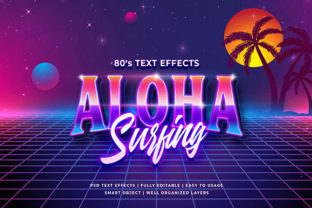
At its core, the 80s Retro 3D Text Effect Mockup is a high-resolution Photoshop file designed to showcase 3D text in a retro aesthetic. It features a detailed background with textures and lighting reminiscent of the neon-lit, synth-driven visuals of the 1980s. The mockup provides a realistic context for how your text will look when applied to real-world designs, making it an invaluable tool for visualizing branding elements before final output.
This mockup supports Smart Object Replacement, which means you can easily swap out the placeholder text with your own custom content. The layers are fully organized into folders, allowing for quick navigation and precise adjustments. With dimensions of 2000x1300 pixels, it offers ample space for creativity while maintaining sharpness and clarity at large sizes.
Key Features and Practical Benefits
- 100% Editable: Every aspect of the text effect is customizable, from font style and color to depth and perspective. This makes it ideal for tailoring to specific brand identities or project themes.
- High Resolution: At 2000x1300 pixels, the mockup ensures that your final output remains crisp and professional, suitable for print and digital use alike.
- No Skill Required: Designed for ease of use, even beginners can navigate the Smart Object feature and layer structure to produce polished results quickly.
- Fully Layered and Organized: Each component is neatly categorized, which streamlines the editing process and reduces the risk of accidental changes.
- Versatile Application: From website headers to T-shirt graphics, the mockup adapts well across multiple platforms and mediums.
Real-World Applications and Use Cases
Designers often seek tools that bridge the gap between artistic vision and technical execution. The 80s Retro 3D Text Effect Mockup serves exactly that purpose by offering a ready-to-use template with extensive customization options. For instance, a small business owner launching a retro-themed café might use this mockup to create eye-catching signage or social media assets. Similarly, a YouTuber producing a video on 80s culture could generate engaging thumbnails or channel banners using the same template.
One practical example involves a marketing agency tasked with promoting a new line of vinyl records. They used the 3D text effect to design album covers and promotional posters, achieving a cohesive visual identity that resonated with their target audience. The ability to replace the text and tweak colors allowed them to align each design with the unique sound and theme of every record, enhancing brand recognition and engagement.
Quality and Usability Assessment
When evaluating design resources, quality and usability are paramount. The 80s Retro 3D Text Effect Mockup excels in both areas. Its high resolution guarantees that outputs remain clear and professional, whether printed or displayed digitally. The Smart Object functionality simplifies the editing process significantly, enabling users to focus on creativity rather than technical hurdles.
Moreover, the layered structure enhances flexibility. Each folder contains grouped elements—such as lighting effects, shadows, and textures—which can be toggled independently. This level of detail empowers users to experiment with different looks without disrupting the overall composition. For those unfamiliar with Photoshop, the mockup includes intuitive layer names and minimal complexity, ensuring a smooth learning curve.
Strengths and Limitations
Among its strengths, the mockup stands out for its vintage-inspired realism. The textures and lighting effects closely mimic the analog aesthetics of the 80s, giving the illusion of a tangible object rather than a flat design. Additionally, its compatibility with various design workflows—from digital publishing to print media—makes it a versatile choice for professionals and hobbyists alike.
However, there are some limitations to consider. While the mockup is optimized for common uses like social media covers and banners, it may not be suitable for all types of projects. For instance, if your design requires a more abstract or futuristic look, the retro styling might feel out of place. Also, since it’s based on a fixed template, extreme modifications (like changing the entire layout) may require additional design work outside the provided structure.
Who Can Benefit Most?
Anyone working within the creative industry can find value in the 80s Retro 3D Text Effect Mockup. Marketers and advertisers looking to evoke nostalgia in their campaigns will appreciate the instant visual appeal. Web developers and UI/UX designers can use it to enhance site headers or call-to-action buttons with a retro twist. Social media managers benefit from its adaptability to platform-specific formats such as Facebook and YouTube covers.
Freelancers and educators also gain from its simplicity and educational potential. As a teaching resource, it helps students grasp concepts like layer organization, lighting effects, and text manipulation in Photoshop. For freelancers, it acts as a time-saving tool that maintains consistency across client projects while adding a distinctive visual element.
Performance in Different Projects
In practice, the mockup performs exceptionally well in projects where retro aesthetics play a central role. For example, a blogger specializing in 80s fashion used it to create article headers and greeting cards, achieving a unified and visually appealing brand presence. Another user, a music producer, incorporated the effect into logo presentations and flyer designs for an upcoming synthwave festival, effectively capturing the event's thematic tone.
Its effectiveness diminishes slightly when used in minimalist or contemporary design contexts. In these cases, the 3D effect and retro textures might clash with the clean lines and muted tones typical of modern design trends. Therefore, it's essential to evaluate how well the mockup complements the existing visual language of your project.
Recommendations and Best Practices
To maximize the utility of the 80s Retro 3D Text Effect Mockup, start by selecting a typeface that reflects the 80s vibe—think block letters, bold serifs, or pixelated fonts. Avoid overly intricate or decorative fonts that may lose clarity in the 3D rendering. Next, adjust the text color to ensure readability against the background. Darker shades tend to pop better, but experimenting with gradients or neon hues can add a dynamic edge.
For optimal results, maintain a balance between customization and restraint. Over-editing the lighting or texture layers can lead to a loss of cohesion in the final image. Stick to the core components of the mockup and make subtle tweaks to preserve the intended effect. When exporting, always verify that the resolution meets the requirements of your target medium to avoid scaling issues.
Long-Term Value and Consistency
A key consideration for any design asset is its long-term value. The 80s Retro 3D Text Effect Mockup proves to be a durable resource due to its structured approach and scalability. Since it’s based on a standard Photoshop format, future updates or revisions to your project can be made efficiently without starting from scratch.
Consistency is another strength. If you’re working on a campaign or brand that consistently uses retro elements, this mockup ensures uniformity across all materials. It also helps maintain a professional appearance by avoiding the pitfalls of amateurish 3D text rendering, which can often appear flat or unrealistic.
Conclusion
The 80s Retro 3D Text Effect Mockup is a well-crafted design tool that successfully blends nostalgic aesthetics with modern functionality. Its high-resolution format, Smart Object replacement, and organized layer structure make it accessible to a wide range of users, from seasoned professionals to newcomers. While it shines brightest in projects that embrace retro themes, it’s worth considering for any design needing a vibrant, three-dimensional text treatment.
If your goal is to streamline your workflow while delivering visually compelling content, this mockup is a strong candidate. Just be mindful of its stylistic roots and ensure it aligns with your project's overall direction. With thoughtful application, it can become a go-to asset in your design toolkit.