Jellyfish Shadow Box 3D SVG: A Creative Digital Craft for All Skill Levels
What is a Jellyfish Shadow Box 3D SVG?
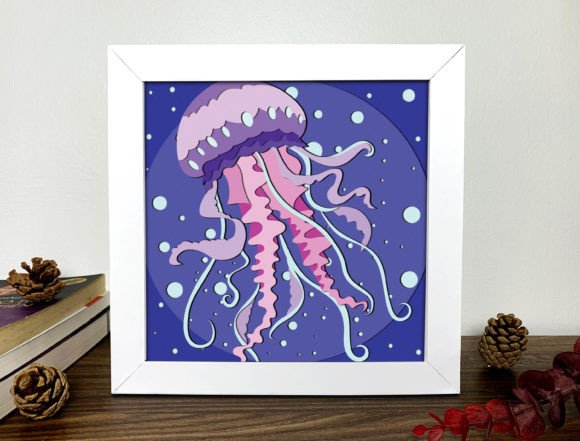
A Jellyfish Shadow Box 3D SVG is a digital design file that allows crafters to create a stunning, three-dimensional shadow box of a jellyfish using various cutting machines. This type of product is especially popular among DIY enthusiasts and hobbyists who enjoy papercraft, card making, home décor projects, and more. The SVG (Scalable Vector Graphics) format ensures high-quality precision when cutting, making it ideal for intricate designs like the delicate tendrils of a jellyfish.
Understanding the Components of the Product
When you purchase a Jellyfish Shadow Box 3D SVG, you are not receiving a physical item but rather a set of digital files designed for use with cutting tools. These files typically include:
- SVG: For use with most modern cutting software and machines.
- DXF: Compatible with vector-based programs and older cutting devices.
- PDF: Provides a visual layout or template for reference.
- EPS: Allows for scalability and is commonly used in professional graphic design.
This multi-format approach ensures flexibility and accessibility for all users, regardless of their preferred tool or experience level.
How It Works: From File to Finished Project
Creating a jellyfish shadow box involves several steps, starting with downloading the digital files. Once you have access to the SVG, DXF, PDF, and EPS formats, you can choose the one best suited for your cutting machine. The recommended device is the Cricut Maker 3, which offers advanced features for precise cuts and layering. However, these files are compatible with almost all major cutting tools on the market, including Silhouette, Brother ScanNCut, and others.
The design consists of 18 layers, each representing different parts of the jellyfish shadow box. These layers help give the final product its 3D appearance, allowing for depth and dimension when assembled. The dimensions of the project are 20x20cm (7.8x7.8in), making it a compact yet impressive addition to any creative display.
Why Choose Paper for Your Jellyfish Shadow Box?
One of the unique aspects of this product is the ability to use different colors of paper for each layer. This opens up a world of creativity, as users can customize the look of their jellyfish to match personal preferences, seasonal themes, or even coordinate with other crafts and decorations. Whether you prefer pastel tones for a whimsical feel or bold colors for a dramatic effect, the choice is yours.
Paper is also an affordable and versatile material, suitable for both beginners and seasoned crafters. You can experiment with textures, patterns, and finishes to make your jellyfish shadow box stand out. Some people even incorporate metallic paper or patterned scrapbooking sheets to add extra flair to their creations.
Benefits of Using a Digital SVG File
Digital SVG files offer numerous advantages over traditional paper cutouts or printed templates. Here are just a few reasons why they're a great option:
- High Precision: SVG files maintain clarity at any size, ensuring clean and accurate cuts every time.
- Customization: Easily change colors, sizes, or elements using compatible design software before cutting.
- Time-Saving: Eliminate the need for hand-drawing or tracing; simply load the file into your machine and let it do the work.
- Eco-Friendly: No packaging waste since it's a digital product. Just download and start crafting!
Where Can I Use My Jellyfish Shadow Box?
Once completed, a jellyfish shadow box can be used in a variety of ways. Its elegant and artistic appeal makes it perfect for:
- Home Decor: Hang it on a wall or place it in a shadow box frame for a decorative touch.
- Gift Giving: Personalize it and gift it to friends or family as a thoughtful handmade present.
- Card Making: Attach it to a greeting card for a 3D pop-up surprise.
- Classroom Projects: Encourage students to explore marine life through art and design.
- Business Promotions: Use it as part of a themed display for events or educational workshops.
Its adaptability and charm make it a valuable addition to any creative space.
Common Misconceptions About Digital Products
Many new crafters may wonder if a digital product is worth the investment. Here’s what you should know:
- It’s Not a Physical Item: As stated, no actual product will be sent. Instead, you receive a downloadable ZIP file containing all the necessary design files.
- Compatibility Is Key: While created for the Cricut Maker 3, the files work with many other machines. Always check compatibility with your specific tool.
- No Special Skills Required: Though some assembly is needed, the process is straightforward and beginner-friendly. Detailed instructions are usually included in the package or available online.
By understanding these points, you can confidently use digital products to enhance your crafting experience without unnecessary confusion.
Getting Started with Your Jellyfish Shadow Box
If you're new to using SVG files for cutting projects, don’t worry—it's easier than it looks. Here’s a simple step-by-step guide to get you started:
- Download the Files: After purchasing, you'll receive a ZIP file with SVG, DXF, PDF, and EPS formats.
- Choose the Right Format: Open the file in your cutting machine’s software. If you’re using a Cricut Maker 3, the SVG file is the best choice.
- Select Materials: Pick your favorite colored papers and any additional materials you'd like to include, such as glitter or foam adhesive for added texture.
- Load and Cut: Load the paper into your machine and follow the cutting settings provided by the designer.
- Assemble the Layers: Carefully glue each layer together according to the instructions, adjusting the spacing to achieve the desired 3D effect.
- Display Your Creation: Place your finished shadow box in a frame or hang it where it can be admired.
This structured approach ensures even first-time users can complete the project successfully. Online tutorials and communities can also provide support if you run into questions along the way.
Why Jellyfish Designs Are Popular in Crafts
Jellyfish are fascinating creatures, often associated with mystery and beauty. Their translucent, flowing forms make them a natural fit for shadow box crafts, where the illusion of movement and depth can be captured so effectively. Additionally, jellyfish are commonly found in ocean-themed projects, which are perennial favorites in both children's and adult crafts.
Using a jellyfish theme also provides an opportunity to educate while creating. Many artists use these designs to spark conversations about marine biology, conservation, and the wonders of underwater life. It's a fun and informative way to bring nature into your living space or classroom.
Encouraging Creativity and Sharing
One of the joys of working with SVG files is the freedom they offer. Each creator can interpret the design differently, leading to unique variations of the same basic structure. I encourage all buyers to not only create their jellyfish shadow boxes but also to share their results with others.
Sharing your work helps build a sense of community and inspires fellow crafters. You can post photos on social media platforms like Instagram or Pinterest, join crafting groups, or even host a mini-workshop. The more we exchange ideas and techniques, the richer our creative experiences become.
Tips for Enhancing Your Jellyfish Shadow Box
Want to take your creation to the next level? Try these tips to add a personal touch:
- Add Lighting: Use LED lights behind the shadow box to illuminate the jellyfish and create a magical glow.
- Incorporate Movement: Attach small motors or wind strings to simulate the jellyfish floating gently in the air.
- Experiment with Textures: Use vellum for the jellyfish body to mimic transparency or try fabric layers for a soft look.
- Personalize the Background: Paint or print a seascape background to complement the jellyfish and enhance the overall presentation.
These enhancements allow you to express your creativity and make your jellyfish shadow box truly unique.
Integrating Technology with Tradition
Modern technology has made it possible to blend traditional craftsmanship with digital innovation. The use of SVG files in papercraft represents this intersection perfectly. By leveraging digital tools, crafters can produce complex designs with ease and consistency.
This shift also means that creators can focus more on the artistic and assembly aspects of their projects rather than spending hours drawing or measuring. The result is a faster workflow and more room for experimentation and customization.
How to Store and Share Your Digital Files
After downloading your Jellyfish Shadow Box 3D SVG, it's important to store the files securely. Keep them in a dedicated folder on your computer or cloud storage service like Google Drive or Dropbox. Organizing your digital assets ensures you can find and reuse them easily for future projects.
Sharing the files with friends or family is also simple—just send the ZIP file via email or messaging apps. However, always respect copyright and usage rights. In most cases, these files are for personal use only, so confirm the terms before sharing or redistributing.
Final Thoughts
The Jellyfish Shadow Box 3D SVG is a fantastic example of how digital products can empower creativity and simplify the crafting process. With its beautiful design, compatibility across multiple machines, and endless customization options, it’s a must-have for anyone interested in papercraft, home décor, or educational projects.
Whether you're a novice trying something new or an experienced crafter looking for inspiration, this design offers a rewarding challenge. So grab your favorite paper, load up your cutting machine, and dive into the world of 3D jellyfish shadow boxes. Let your imagination flow—and don’t forget to share your masterpiece with others!